

Messaging limits — what they are and how to increase them (250 → unlimited)
🎯 Goal
Know how many customers you can message today, why campaigns stop at a limit, and how to raise it to unlimited.
🧰 What you need
- A connected number
What the limit is
Section titled “What the limit is”The messaging limit is how many unique people you can start conversations with, by sending a template outside the 24-hour customer service window, in a moving 24 hours.
- Replies aren’t limited. When a customer writes to you, everything you send inside their open 24-hour window doesn’t count.
- It counts people, not messages. Three templates to the same person in a day count once.
- It belongs to your business portfolio, not to one number. Every number in the portfolio shares it, so one number can use up the whole allowance. (Meta made this change on 7 October 2025.)
Source: Meta: messaging limits, checked 29 October 2026.
The tiers
Section titled “The tiers”- 250people / 24 h
Where every new business portfolio starts.
- 2,000people / 24 h
After business verification, or 2,000 delivered template messages to unique people in 30 days with high-quality templates, then Meta’s quality check.
- 10,000people / 24 h
Automatic: high-quality messages and at least half your limit used in the last 7 days. Rises within 6 hours.
- 100,000people / 24 h
Automatic, same rule.
- Unlimitedpeople / 24 h
Automatic, same rule.
-
Every new business portfolio starts at 250. A new number added to an existing portfolio gets the portfolio’s current limit.
-
250 → 2,000 happens through one of these paths, followed by Meta’s quality check:
- Verify your business, or
- send 2,000 delivered template messages outside the 24-hour window to unique people within 30 days, using high-quality templates.
If Meta approves, it raises the limit to 2,000 immediately. If not, the limit stays and Meta sends an alert with other ways to qualify.
-
From 2,000 upwards it’s automatic. When you send high-quality messages across all your numbers and templates and used at least half of your limit in the last 7 days, Meta raises it one step within 6 hours.
Check your limit and quality
Section titled “Check your limit and quality”In MeAPI: My Numbers → Number health shows each number’s Messaging limit with how much you used in the last 24 hours (amber at 70%, red at 90%), its Quality and Throughput. Home shows a short Number health card too. Number health
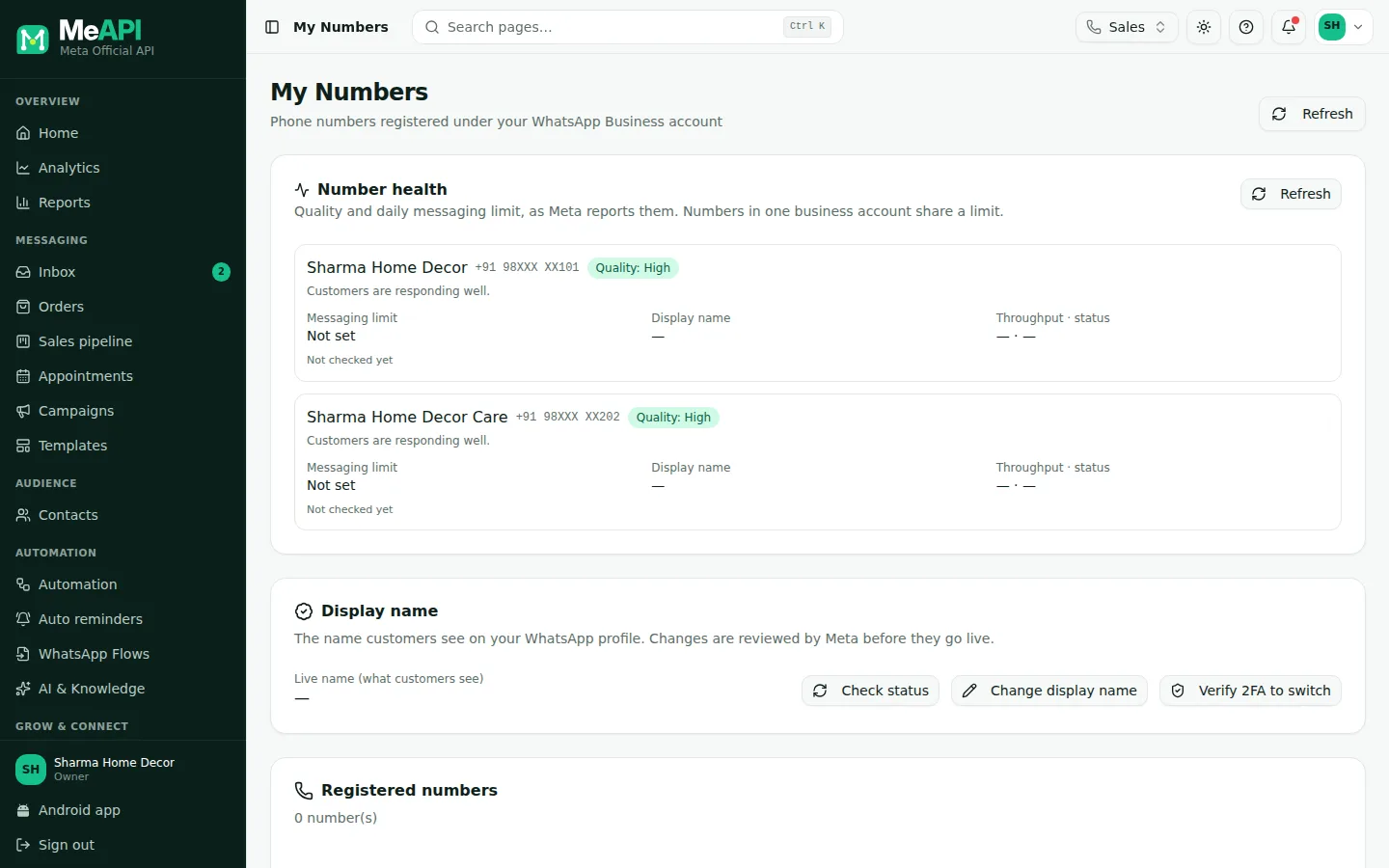
- Messaging limit: your tier and how many people were reached in the last 24 hours.
- Quality: High / Medium / Low from customer feedback over the last 7 days.
In Meta: WhatsApp Manager → Account tools → Messaging limits.
Messaging limits
- Business portfolio
- Sharma Sweets
- Current limit
- 2,000 people in 24 hours
- Business verification
- Verified
- Next limit
- 10,000, when you use half your limit with high-quality messages
Increase your limit: checklist
Section titled “Increase your limit: checklist”- Verify your business in Meta’s Security Center. This is the quickest way past 250. How
- Get your display name approved. How
- Keep quality High. Message only people who opted in, say who you are, and make every message useful.
- Prefer Utility templates for updates and reminders. They’re blocked far less than promotions.
- Use at least half your limit on most days of a week. That’s what triggers the automatic rise.
- Grow steadily. Send to your most engaged contacts first, then widen.
- Watch the campaign report for blocks, failures and low read rates. They’re early warnings.
What holds a limit back
Section titled “What holds a limit back”- Low-quality messages. Meta only raises limits for high-quality messages across all your numbers and templates. Since October 2025 a quality drop no longer lowers the limit, but it stops the rise.
- Not using it. If you use less than half the limit in 7 days, nothing changes.
- Restrictions on the account. A policy violation can stop sending altogether: 368, 131031. A spam rate limit is error 131048.
- Template category violations, error 131064, limit sending until the enforcement period ends.
Not the same thing: throughput and the per-user marketing limit
Section titled “Not the same thing: throughput and the per-user marketing limit”| What it limits | Typical value | When it bites | Error | |
|---|---|---|---|---|
| Messaging limit | How many people you can start conversations with per 24 h (business portfolio) | 250 → unlimited | Big campaigns to new people | Sends beyond it fail; MeAPI warns before launch |
| Throughput | How fast one number sends | Up to 80 messages / second; up to 1,000 for eligible numbers | Very large campaigns | 130429: MeAPI slows down and continues |
| Per-user marketing limit | How many marketing templates one person gets from all businesses | Set by Meta per person, based on engagement | Promotions to people who rarely read them | 131049: wait 24 h or more |
| Pair rate limit | Many messages to the same person in a short time | — | Loops, rapid repeats | 131056 |
Marketing messages sent inside an open 24-hour window don’t count toward the per-user marketing limit. Sources: throughput, per-user marketing limits.
What MeAPI shows when you reach the limit
Section titled “What MeAPI shows when you reach the limit”- Before you launch a campaign, the review step warns when the audience is bigger than what’s left: “This campaign reaches 3,000 people, but your messaging limit leaves 1,200 of 2,000 for the next 24 hours. Meta will reject the rest — split the audience or schedule part of it for tomorrow.”
- Auto reminders hold back at 95% of the limit and try again an hour later, with the reason in the Log.
- Number health turns the bar amber at 70% and red at 90%.
- Messages Meta rejects show as failed in the campaign report with Meta’s reason and code. See Meta error codes.
Common mistakes
Section titled “Common mistakes”- One big blast on day one. At 250 a day, a 5,000-person list takes weeks and burns quality. Verify first, then grow.
- Counting replies. Chatting with customers who wrote to you never uses the limit.
- Forgetting the limit is shared. A second number in the same portfolio doesn’t double it.
- Buying lists. Blocks and reports stop the limit from rising and risk the account.
What’s next
Section titled “What’s next”Was this page helpful?
Thank you — we read every comment.
Could not send right now. Please try again later.
© 2026 MeAPI by TheWebStore028 · RADHAMADHAV WEBSTORE LLP · GSTIN 27ABJFR6148J1ZO · Contact us ·Cookie settings